



Product of the Day
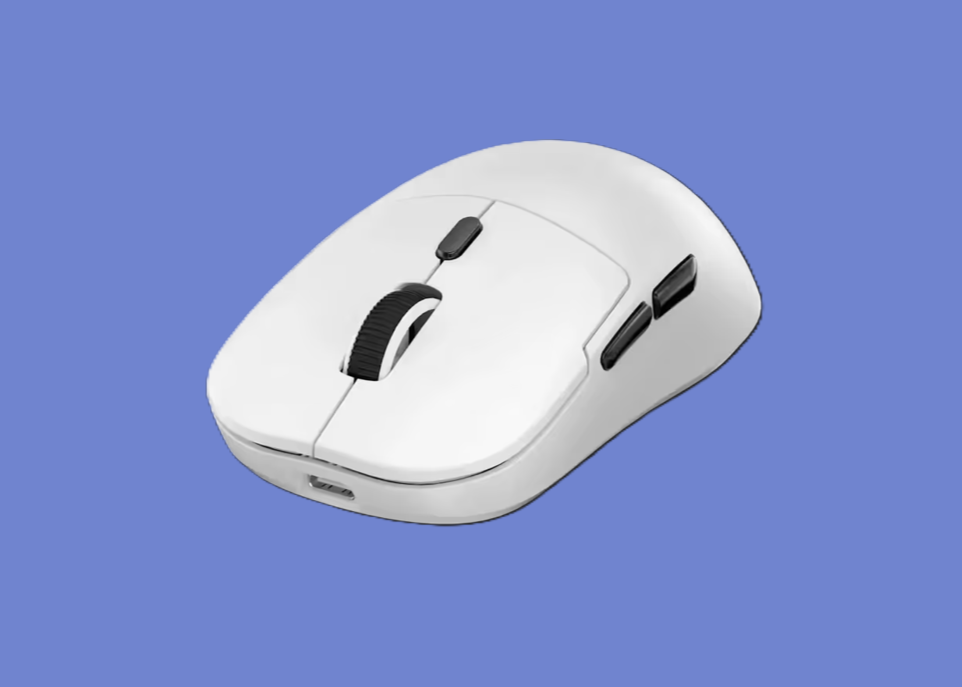
Marvo gaming mouse clicks with value
The Niro 50 combines three connection options, long battery life and a clean design at an accessible price, writes ZIANDA GOLDSTUCK.

What is it?
Gaming accessories often force buyers into a compromise, with a low price usually meaning sacrificing features, while premium functionality often comes with an equally premium price tag. However, the Marvo Niro 50 gaming mouse narrows that gap by offering wireless flexibility, solid performance and a comfortable design without stretching the budget.
Straight out of the box, the Niro 50 impresses with an understated design. Available in black or white, the mouse avoids the exaggerated styling common to many gaming models, making the device equally suited to an office desk or gaming setup. Clean lines, subtle RGB lighting and an ergonomic shape help the mouse sit comfortably in the hand during extended use.
I tested the Niro 50 while playing Letter Lost and Paralives, as well as during everyday work. I was pleased with how comfortably the mouse handled both work and play.
The biggest selling point is the trio of connectivity options. Users can switch between Bluetooth, a 2.4GHz wireless connection via the included USB receiver, and a traditional USB-C wired connection with the included cable. This versatility makes the mouse suitable for multiple devices, allowing the Niro 50 to move between a desktop gaming PC, laptop or tablet with minimal fuss. Marvo has included a built-in storage slot for the USB receiver, making the dongle easy to insert or remove while helping prevent the receiver from going missing.
The wireless performance proved extremely dependable. The 2.4GHz connection, which supports a polling rate of up to 1,000Hz, delivered responsive input during fast-paced games. Bluetooth, which operates at 125Hz to prioritise battery efficiency, offered a convenient option for everyday productivity without occupying a USB port.
Switching between modes was quick and intuitive. I was particularly pleased that using the mouse via Bluetooth did not prevent Bluetooth headphones from staying connected to my laptop at the same time, with no glitches or cutouts on either device.
The mouse offers broad compatibility, with support for Windows 7 and later, macOS 10.10 and newer, Android and iOS devices.
The optical sensor offers adjustable DPI settings up to 12,000, providing enough flexibility for everything from precise aiming in first-person shooters to rapid cursor movement across large displays. While professional esports players may prefer flagship sensors with higher specifications, the Niro 50 offers more than enough precision for most gamers.
The mouse is lightweight without feeling flimsy. That balance contributes to reduced fatigue during long gaming sessions while still giving it enough substance to feel well built. The mouse weighs 63 grams and feels agile without feeling insubstantial. The textured side grips improve control, particularly during quick movements, while the 100% PTFE skates allow smooth gliding across a variety of surfaces, even without a mousepad.

Battery life is one of the Niro 50’s strongest assets. Rather than relying on disposable batteries, the mouse charges via USB-C, making the device convenient to top up between gaming sessions. A built-in 500mAh rechargeable battery delivers up to 140 hours of use in Bluetooth mode, reducing the need for constant charging. For users who spend long hours working or gaming, that endurance is likely to become one of the mouse’s most appreciated features. A favourite feature of mine was that the mouse can still be used via Bluetooth or the USB receiver while charging, although this mimics the feel of a wired mouse.
The Niro 50 features seven programmable buttons, allowing users to tailor controls to suit their favourite games or productivity software. Through Marvo’s online software, users can assign macros, rebind buttons, adjust RGB lighting and fine-tune DPI settings. Better still, the mouse includes onboard memory, allowing personalised settings to travel with the device rather than remaining tied to one computer.
The interface is straightforward, giving users access to useful functionality without becoming overwhelming. Build quality is better than expected. The buttons provide satisfying tactile feedback, while the scroll wheel feels precise without becoming overly stiff. A button allows quick sensitivity adjustments without interrupting gameplay, making it useful when switching between fast-paced action and precision aiming. Tracking remained smooth and accurate throughout testing while navigating everyday tasks and playing fast-paced games.
While the Niro 50 does not attempt to compete with premium hardware, the mouse succeeds in delivering the features that are most in demand. There are, however, a few compromises. The RGB lighting is relatively modest compared to higher-end gaming mice, although this offers a clean aesthetic. The maximum 12,000 DPI sensor will satisfy almost every gamer, but enthusiasts chasing the highest specifications may still gravitate towards flagship models with more advanced sensors and higher polling rates. Those omissions are unlikely to concern most buyers, especially considering the price.
How much does it cost?
The Marvo Niro 50 gaming mouse is available on the Evetech website at a recommended retail price of R749. A current sale has reduced the price by 40% to R450.
Does it make a difference?
The Marvo Niro 50 is an affordable wireless gaming mouse that feels more capable than the price suggests. The feature set makes the device a strong option for students, first-time PC gamers and anyone who wants one device for work and play.
What are the biggest negatives?
- The sensor is not flagship-level.
- The RGB lighting is modest.
- The polling rate trails premium models.
What are the biggest positives?
- The mouse offers three connection modes.
- The battery lasts up to 140 hours.
- The design feels light, smooth and comfortable.