


Gadget of the Week
Gadget of the Week: Epson takes on the home office
Filling the EcoTank L6370 is easy; finding one’s way through its app, not so much, writes ARTHUR GOLDSTUCK, with JASON BANNIER.

What is it?
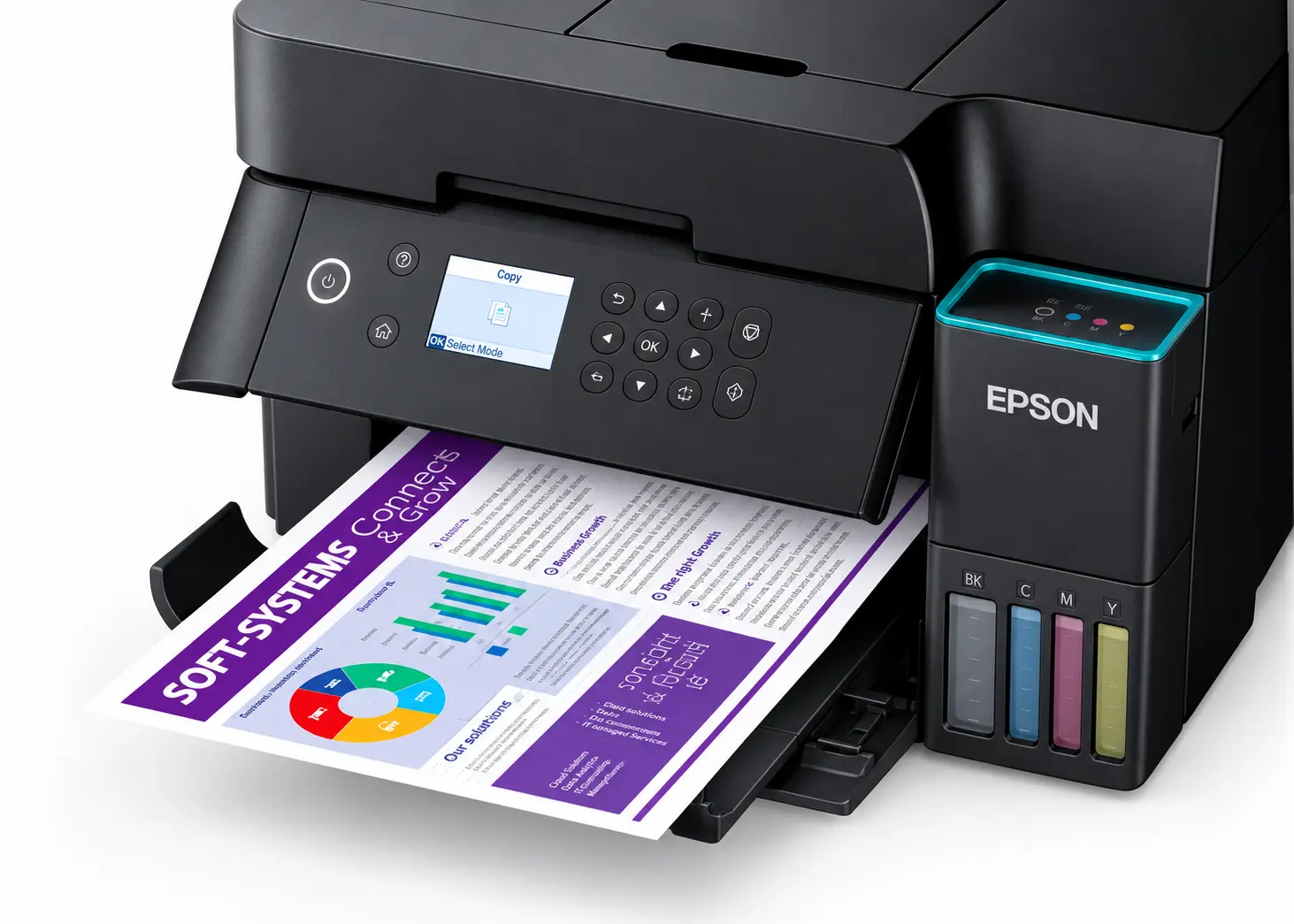
The Epson EcoTank L6370 multifunction printer starts setup with one of the simplest instructions a home-office device can offer: scan a QR code.
A small colour LCD screen on the front displays the code when the machine is first powered on. Scanning it prompts installation of the Epson Smart Panel app on a smartphone, from where one is guided through setting up printing, scanning and copying.
For the most part, this works fine. Filling four ink tanks, usually the most intimidating part of setting up a tank printer for the first time, proved straightforward. No ink-stained hands…
The app took us through opening the ink tank cover and filling each coloured reservoir with its corresponding bottle. The bottles fit directly into the filling ports, and the ink stops flowing when a tank is full. The bottles are colour-keyed to their respective tanks, so the wrong colour will not fit.
Once we confirmed that the tanks were filled, the printer began drawing ink through its internal system, which Epson calls ink charging. It took about 11 minutes, with the printer displaying a progress bar. The app, meanwhile, moved on to Wi-Fi setup, but without making it clear if I could continue while the printer was busy. Instead, I waited.
When ink charging was complete, the app asked for the printer’s administrator password. A paper manual directed me to the scanner section, but I could find no password. Eventually, we used the printer’s buttons to select a Wi-Fi network and complete the connection.
That brought up a firmware update, accompanied by a warning to leave the printer switched on. The screen went black, while the light around the power button pulsed. After a long wait without a completion message, I pressed OK, and the display returned. The app later confirmed the update had completed. A message on the printer at the time would have spared some guesswork.

How does it print?
At first, printing appeared seamless. A photo uploaded through the app and sent to the printer printed immediately. Then the app lost its connection. We changed Wi-Fi networks on the printer’s control panel, and it worked again. This time, it carried on working.
The photos were bright and attractive when viewed from a few metres away. Up close, colourful images were less impressive. We had to choose the high-resolution setting to bring the prints close to the vibrance of the originals. However, black-and-white images came out sharp and clear.

Printing from a phone is simple when the Epson Smart Panel can find the printer: select an image and send it. The app also allowed us to select several images for one job. However, it refused to accept a separate job while the printer was busy, so we had to wait for the current job to finish before sending the next one.
The administrator password turned up later, near the paper insertion slot, while we were following an Epson YouTube guide to loading paper. The video did not point it out. someone happened to see the label as we loaded the tray, well away from the position identified in the manual.
Plenty of useful office hardware lurks behind these detours. The L6370 is an A4 printer, scanner and copier with a 30-sheet automatic document feeder and a 250-sheet front paper tray. It supports automatic double-sided printing, scanning and copying. The feeder would be useful to anyone who regularly handles lengthy contracts or other multi-page documents.
Epson quotes print speeds of up to 18 pages per minute in black and white and nine in colour. It also supports borderless A4 printing and connects by Wi-Fi, Wi-Fi Direct, Ethernet or USB.

What does it cost?
South African retail listings for the EcoTank L6370 range from rR6,300 to R9,000.
Is it different?
A cheap home printer can become an expensive way to print regularly once cartridge replacements add up. The L6370 costs more upfront, but supplies refillable tanks alongside a paper tray and document feeder suited to routine office work. Epson rates the ink supplied in the box for up to 15,100 black pages and 5,500 colour pages, depending on what you print. For long-term use and typical office printing, it is a cost-efficiency champion.
What are the biggest negatives?
- The Epson Smart Panel app gives little guidance when ink charging.
- The paper manual gives the wrong location for the administrator password.
- The Smart Panel does not let one queue a separate print job while the printer is printing.
What are the biggest positives?
- Filling the keyed ink tanks is clean and unusually easy for a first-time tank-printer user.
- The 250-sheet tray and automatic document feeder are useful for regular office paperwork.
- Automatic double-sided printing, scanning and copying can save time on multi-page work.
* Arthur Goldstuck is CEO of World Wide Worx, editor-in-chief of Gadget.co.za, and author of The Hitchhiker’s Guide to AI – The African Edge. Jason Bannier is deputy-editor of Gadget.