


Gadget of the Week
Gadget of the Week: Rapoo’s
silence is golden
How much more technology can be built into a mouse? The Rapoo M590 Silent gives us a good idea, writes ARTHUR GOLDSTUCK.

What is it?
A wireless mouse has become a standard tool for any mobile worker, yet there is no standard approach to building these devices. That is good news, of course, since it means users can look for variations that suit their specific needs, especially gamers who expect specific action buttons, or designers who need smooth scrolling.
We mere mortals may imagine we only need a mouse that moves and left-click or right-click buttons. That had always been my attitude to these gadgets, and I only demanded one thing more: that they connect without a fuss to my laptops. Usually, it has been a hit-and-miss business, as I patiently watched connection lights underneath the mice flashing, to no avail, as my laptop ignored their existence.
When my laptop alerted me to the presence of the Rapoo M590 Silent mouse the moment I activated the connection button, I realised I had found a productivity ally. So, instead of giving a cursory glance at its ability to right-click, left-click and move about, I chose to explore the additional features.
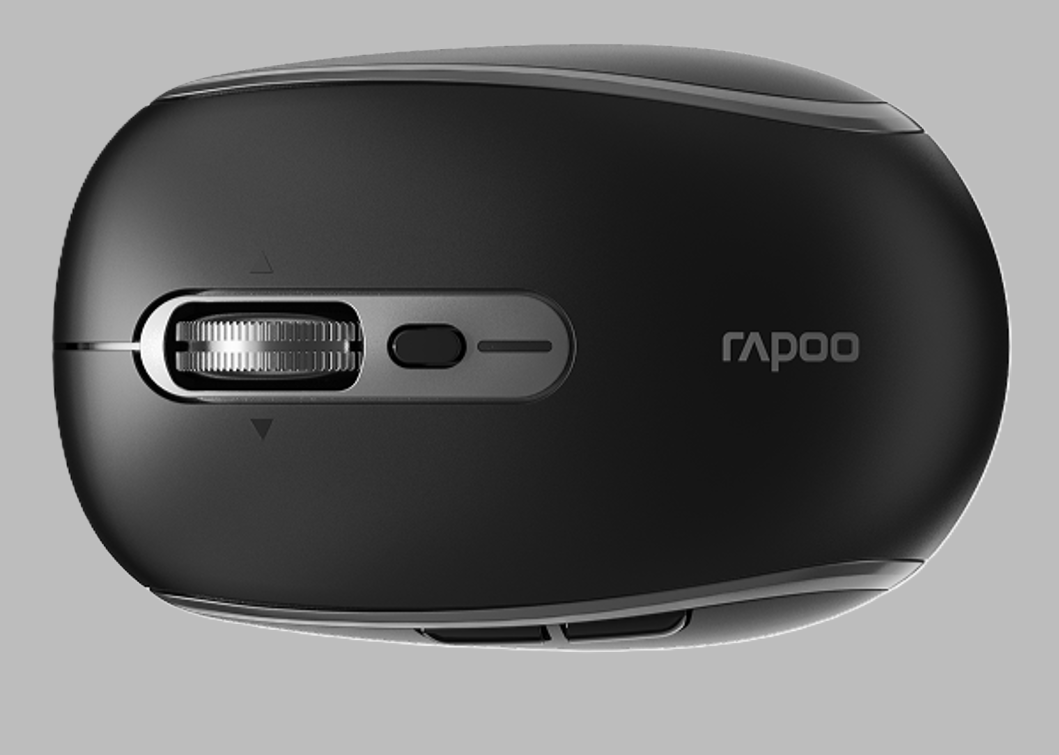
Not that there is far to explore on the outside of this compact, solid little machine. The familiar left and right buttons are joined by a metal scroll wheel, a sensitivity button and two buttons on the left side. Underneath the chassis, a connection selector and power switch look pretty basic, too.
The battery compartment houses a small surprise: a tiny USB-A dongle. It provides a 2.4GHz wireless connection for a computer without Bluetooth, or one on which Bluetooth is already creating enough trouble. It is a dedicated wireless receiver, so it does not add Bluetooth capability to the computer itself. The compartment doubles as a safe place to store it during travel, which is a welcome precaution against the mysterious disappearance of single socks and foreign plug adaptors.
The Bluetooth connection is only the beginning of the M590’s versatility. It supports both Bluetooth 4.0 and 5.0, as well as that 2.4GHz receiver, and can be paired with up to three devices. A button underneath allows switching between the connections. For anyone alternating between a desktop computer and a laptop, or using a tablet alongside either, that saves the bother of pairing the mouse from scratch every time.
The wheel is probably the secret weapon. Rapoo calls it an infinity scroll wheel, allowing it to spin freely through a long document or web page. It can also be tilted left or right for horizontal scrolling, a great option when a spreadsheet or badly formatted email stretches beyond the edge of the screen. This is the kind of feature normally associated with more expensive productivity mice, and one of the features that gives this ordinary-looking mouse an edge.
A small button behind the wheel changes the sensitivity of the optical sensor, with five settings from 1,000 to 4,800 dots per inch (DPI). In plain language, the higher the setting, the further the pointer travels on screen for the same movement of the mouse. That allows a quick adjustment between precise work and moving across a large display.
Rapoo calls its optical tracking system a Blue Sensor, and says it can follow movement on surfaces ranging from paper and fabric to leather. This is great for the traveller whose a mouse has to go wherever a laptop goes – in particular the startlingly varied surfaces presented by hotel room desks and tables.
Its compact dimensions, 98.3mm long and 62.4mm wide, make it easy to fit into a laptop bag, and its 80g weight keeps the load negligible.
Finally, the word Silent in the name refers to its muted click switches. Anyone who has worked near an angry mouse-clicker will appreciate that. The mouse uses a single AA battery, already installed, and comes with a two-year limited hardware warranty.
What does it cost?
The Rapoo M590 Silent is available for R465 from Amazon and Takealot, with navy, black and pink versions advertised.
Does it make a difference?
Compact yet versatile, solid yet nimble, the M590 made its best first impression before I had clicked on it, thanks to connecting immediately. Extra connections, adjustable pointer speed and an energetic scroll wheel give it appeal well beyond its size and price.
What are the biggest negatives?
- The compact body may feel cramped for people with large hands.
- The AA battery must be replaced instead of recharged through a cable.
- The USB receiver uses USB-A, so a USB-C-only laptop would need an adaptor to use it.
What are the biggest positives?
- It connected instantly to my Bluetooth-enabled laptop, without the typical pairing frustrations.
- It offers rapid scrolling and horizontal movement through long documents and wide spreadsheets.
- Its compact, solid design and three-device connectivity make it an excellent travelling companion.
* Arthur Goldstuck is CEO of World Wide Worx, editor-in-chief of Gadget.co.za, and author of The Hitchhiker’s Guide to AI – The African Edge.