


Product of the Day
Asus activates on-the-go laptop power
The Zenbook A14 feels polished and responsive, although a 60Hz display and high price tag are significant drawbacks, writes JASON BANNIER.

A workday split between offices, airports and coffee shops requires technology that can keep pace and fit in one’s bag. The 2026 Asus Zenbook A14 laptop proves that it can fill that space, both literally and figuratively.
What is it?
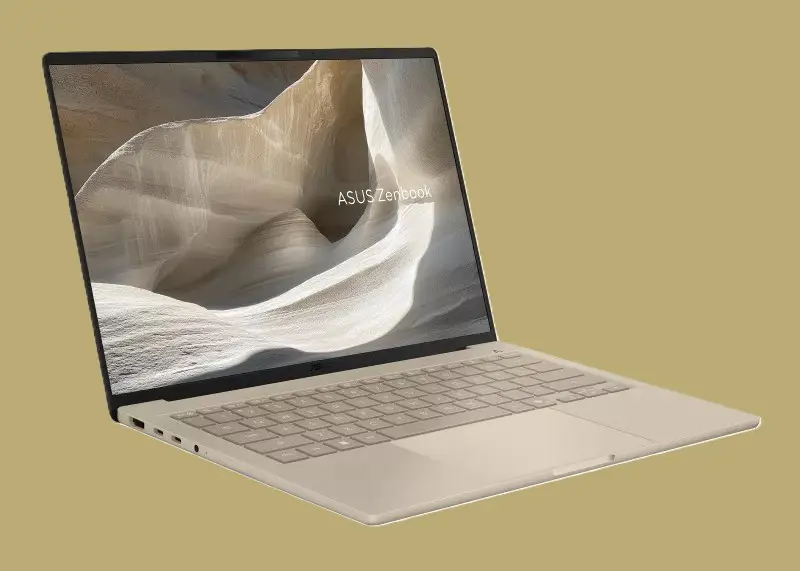
The most impressive feature of the A14 Copilot+ PC is its lightweight build: it weighs a mere 990g, and picking up the device with one hand gives the impression of a machine built for adventure, although not necessarily the rainforest kind.
The more likely quests would involve moving between desks, cafés and wherever else work happens. The A14 remains easy to carry without the chassis feeling flimsy.
Ceraluminum, Asus’s proprietary ceramic-aluminium composite, forms part of the build. The material has a distinctive tactile feel and is designed to resist scratches and wear. Before the hinge opens, the machine already feels pleasant to handle. The result is a laptop designed to move between different working environments.
The thin design does not come at the expense of hardware. The A14 uses a processor called the Qualcomm Snapdragon X2 Elite X2E-88-100, which has an 18-core CPU, combining 12 Prime and six Performance cores. Clock speeds reach 4.0GHz across multiple cores and 4.7GHz on one or two cores. Adreno graphics work alongside an 80 TOPS Hexagon neural processing unit (NPU), which handles AI and machine-learning processes. The device includes 16GB of LPDDR5X RAM and a 512GB PCIe 4.0 SSD for storage. These specifications qualify the device as a Copilot+ PC, Microsoft’s category of Windows laptops designed to run AI features directly on the device through a dedicated NPU.
The Zenbook reaches a usable desktop quickly after boot-up. Browsers match that responsiveness and open readily. Moving between applications, such as Microsoft Word and PowerPoint, while keeping several Edge tabs open causes no noticeable slowdown during longer periods of use. For these tasks, the device operates in almost complete silence.
The Snapdragon platform runs Windows 11 on Arm, a different processor architecture from the x86 platform used by most Intel and AMD laptops. Windows can run many standard x86 and x64 applications through built-in translation, while Arm-native apps run directly on the processor. That difference should have little effect on common productivity software for most users. However, older applications, specialist plug-ins, hardware drivers or niche peripherals may require Arm compatibility to work correctly.
Connectivity is practical. Two USB4 Type-C ports sit alongside a USB 3.2 Gen 2 Type-A port, HDMI 2.1 and a 3.5mm audio connection. However, the lack of an Ethernet port or SD card reader may matter for users who use wired networking or removable storage of that kind.
A backlit keyboard with three brightness levels glows with a slight purple colour. While not as mesmerising as keyboards with full RGB lighting, the illuminated hue is appealing. The keys provide 1.3mm of travel, and typing feels comfortable.
The touchpad tracks accurately, although the mechanical click feels unbalanced. Pressing near the bottom produces noticeably more travel than pressing higher on the pad. That difference is typical of a hinged mechanical touchpad, but the uneven tactile response slightly weakens an otherwise polished input experience. By contrast, tap-to-click feels consistent and responsive across the touchpad.
Two speakers with Dolby Atmos support deliver clear and loud audio. A full HD webcam provides adequate image quality for video calls, although picture quality does not stand out. An interesting feature is Asus Adaptive Dimming, which uses the AI-powered camera to detect when the user looks away. The display dims automatically, then brightens again when attention returns. This makes the A14 feel attentive and ready to respond.
Display and battery
A 14-inch OLED panel delivers excellent colour, while text appears sharp. Reflections are not a concern during indoor use, but direct sunlight from behind can make the glossy panel difficult to view.
A 60Hz display is a notable limitation. Higher refresh rates can matter most for gaming, which is not the laptop’s focus, but the difference can affect everyday use. Scrolling and on-screen movement feel less fluid than on higher-refresh-rate panels, making 60Hz feel modest for a premium laptop.
Nevertheless, the laptop feels well suited to productivity, streaming and general media work. The display uses a 1,920 x 1,200 resolution in a 16:10 aspect ratio, covers 100% of the DCI-P3 colour gamut, and offers 400-nit typical brightness with a claimed 600-nit HDR peak.
Battery performance ranks among the A14’s strongest qualities. The 70Wh battery can support a full working day at lower brightness settings, with substantial capacity remaining during lighter productivity workloads. Asus claims more than 33 hours of continuous video playback under controlled conditions.
The endurance makes the A14 practical for travel or extended periods away from a charger. The laptop supports a 100W USB-C power adaptor and can reach about 50% charge in 30 minutes.
How much does the Asus Zenbook A14 cost?
The Asus Zenbook A14 UX3407NA is available at a recommended retail price of R39,999 on Takealot.
Why should you care?
The Zenbook A14 performs well as a portable, primary work machine. The Snapdragon X2 Elite gives the laptop strong performance for demanding office workloads, multitasking and general media use without making mobility feel like a compromise. The combination suits on-the-go users who want a premium device that can be easily moved between settings.
Copilot+ PC support adds longer-term value beyond the usual productivity experience. The dedicated NPU enables Microsoft’s growing range of on-device AI features, including smarter search, live translation and camera effects. These tools are available and still developing, but the hardware gives the A14 room to benefit as Windows gains more local AI functions over time.
The same hardware can support AI workloads beyond Microsoft’s own Copilot+ features as more applications make use of NPUs. Local processing can reduce reliance on cloud services, giving the A14 additional practical value when working on the go.
What are the biggest negatives?
- The 60Hz refresh rate feels modest for a premium laptop.
- The touchpad’s mechanical click is inconsistent, but tap-to-click is reliable.
- Specialist Windows software and peripherals may require Arm compatibility checks.
- At R39,999, the device is expensive.
What are the biggest positives?
- At 990g, the device is light enough to carry around easily.
- The backlit keyboard looks appealing and feels comfortable to use.
- The OLED display delivers excellent colour and sharp text.
- Battery life is strong, and recharging is fast.
*Jason Bannier is a data analyst at World Wide Worx and deputy editor of Gadget.co.za. Follow him on Bluesky at @jas2bann.